Keyboard
Open the keyboard with the Keyboard button on the Layout Mode toolbar.
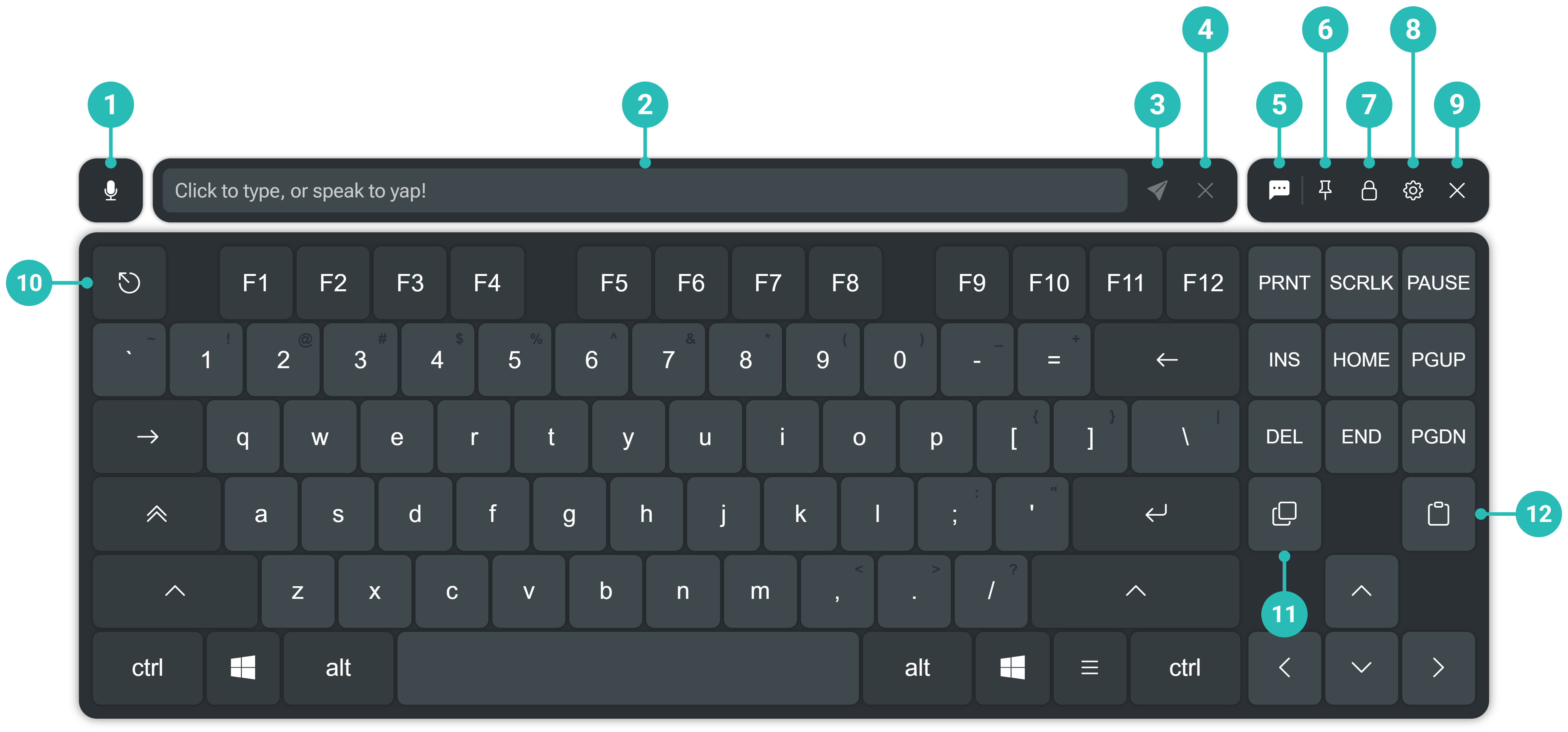
| # | Element | Description |
|---|---|---|
| 1 | Speech to text | Starts voice recognition. What you say appears in the composer. Set the microphone in Voice settings. |
| 2 | Composer | Type or dictate text before sending it. |
| 3 | Send | Sends the composed text to the focused window, or to your VRChat chatbox when VRC chatbox is on. |
| 4 | Clear | Clears the composer. |
| 5 | VRC chatbox | Toggle. When on, Send posts to your VRChat chatbox instead of the focused window, up to 144 characters. Shown only while VRChat is running with OSC enabled. |
| 6 | Pin | Keeps the keyboard visible when Layout Mode is closed, like an overlay's Pin. |
| 7 | Lock | Locks the keyboard, like an overlay's Lock. |
| 8 | Settings | Opens XSOverlay's settings. |
| 9 | Close | Hides the keyboard. |
| 10 | Escape | The Escape key. |
| 11 | Copy | Copies the selection. |
| 12 | Paste | Pastes from the clipboard. |